Frequently Asked Questions (FAQs)
To view frequently asked questions by physicians, download Physician FAQs.
Do I need an internet connection to use Orion?
Yes. Orion requires an internet connection.
How do I get sign-in credentials for Orion?
You must contact Resmed customer support.
Can my organization just have one set of sign-in credentials for the entire office?
Orion requires each individual to have a separate account. Each user at any organization will have their own profile and sign-in credentials.
Does Resmed provide load balancing and redundancy?
Yes. Each data center has independent and redundant power, cooling and networking. The data centers are physically separated by a meaningful distance (several miles) and are interconnected by high-bandwidth, high performance networks. All traffic between data centers is encrypted. Resmed designed Orion to operate across multiple data centers to ensure high availability during events, such as power outages or extreme environmental conditions (for example, lightning strikes, tornadoes or earthquakes).
Does Resmed provide protection against cyber attacks?
Yes. Resmed implements several services, including a web application firewall, network access control lists and security groups. These tools limit traffic and scan for disruptive patterns or malicious intent, such as denial of service attacks, and block them entirely.
Does AWS have privilege management or database activity monitoring controls?
Yes. Access to the application servers is restricted to Resmed staff through secured access. This access provides different levels of access privilege, following the role-based access control (RBAC) principle. Actions performed on servers and databases are logged.
Are system logs maintained?
Yes. Resmed records all user actions as required in the HITRUST framework. Resmed has defined and applied a log retention policy for troubleshooting, security and compliance purposes.
From what date does Orion download my patient's data?
Orion associates PAP machine data with a patient starting from the Machine assignment date.
I have not received data from a patient's machine for more than three days. Why?
Check the following:
The PAP machine is turned on at all times. If the machine is not on, it cannot transmit data.
The PAP machine serial number listed in Orion matches the number assigned to the patient.
I have no wireless connectivity. Why?
Wireless coverage may be poor. Check the wireless signal strength icon on the PAP machine.
What is the maximum number of days of detailed data that I can download?
You can download a maximum of 30 days of data from your last available detailed data sessions.
How can I create a report with custom dates?
The fixed time period or date range report options allows you to specify custom dates. For the fixed time period report option, enter the number of days prior to the report end date in the provided field (up to a maximum of 365 days). For the date range option, select the two dates for the report period to cover.
How do I print a report?
When you download a report, you can open and print the report from the save destination folder.
Are the detailed data parameters on the graph average or median values?
The detailed data parameters are average values.
Can I change the Machine assignment date after I add a PAP machine for a patient?
Yes. You can change the therapy start date from the Equipment page. Click Edit machine for the PAP machine you want to update. The Machine assignment date sets the first day of data access. You cannot set the new date to more than 365 days in the past.
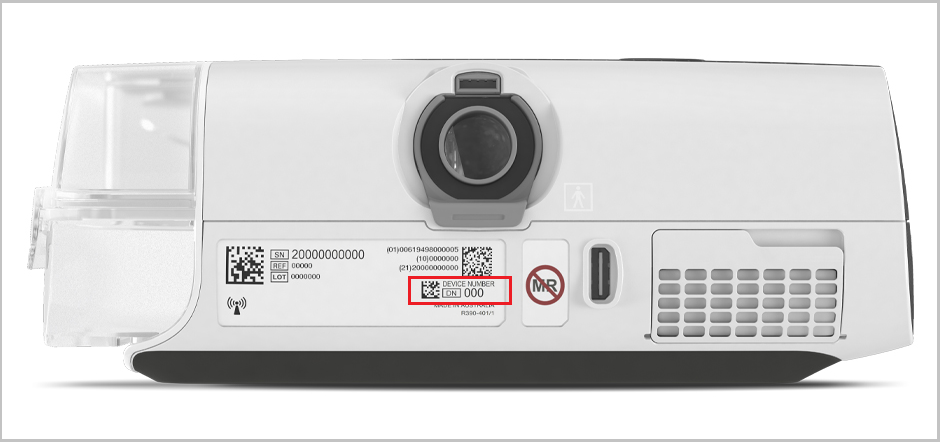
Where can I find the device number?
The device number (DN) is located on the label on the back of the machine.
I changed the PAP machine settings in Orion but the old settings are still displayed. What should I do to display the new settings?
Refresh your browser to reflect the updated settings. After you update settings in Orion, a Setting changes pending notification displays until they are applied to the machine.
Remind your patient to check their PAP machine's wireless signal before starting therapy. A strong signal is required to apply machine setting changes remotely.
Ask your patient to verify the wireless signal strength icon at the top right of the machine's screen:
All bars mean good wireless coverage.
A few bars mean poor wireless coverage.
No bars mean no connection.
Instruct your patient to keep their machine connected to the power outlet at all times and make sure that the machine is not in Airplane mode.
The availability and quality of the wireless network can be affected by terrain, buildings and the weather. Wireless communication depends on network availability. Coverage is not available everywhere and varies by service.
How do I know if the PAP machine settings change was applied successfully?
You will see a No settings changes pending notification next to the PAP machine on the Equipment page. You will also see the date the last settings change was applied.
Who do I contact for any Orion administration questions?
For all Orion administrative questions, contact us at orion-beta-suppport@resmed.com.
Who do I contact for Orion support?
For all Orion support questions, the email address is orion-beta-support@resmed.com.
How do I request an SBOM?
To request an up-to-date software bill of materials (SBOM) that lists all components, libraries and modules in the software, email orion-beta-support@resmed.com.
What is the definition of compliance or a compliant patient?
Orion's default definition of compliance is based on the Centers for Medicare & Medicaid Services (CMS) standards.
The patient must use the PAP machine at least 4 hours a day on 21 of 30 days in the first 90 days